
Live RTP Tracker
Refresh Stake or switch currencies without losing your session totals.
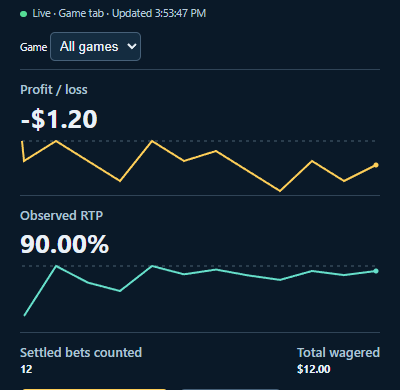
Keep the Chrome overlay open to follow your observed RTP and profit or loss across games. Sync the sessions you want to keep to your StakeExplorer account.
Current version 0.2.9 · Desktop Chrome
Install the overlay
- Download the ZIP above and extract it to a folder you’ll keep.
- Open
chrome://extensionsin desktop Chrome. Turn on Developer mode, click Load unpacked and choose the folder containingmanifest.json. - Chrome opens the setup guide after installation. Follow it to pin the tracker and start your first session.
Keep a session
In the overlay, choose Connect to StakeExplorer, then confirm Share with your account. Once you see Saved to, you can revisit that session’s totals and graphs on any device signed in to the same account.
You can bet in USD while My Bets shows IDR, or switch currencies mid-session. The overlay reads each bet’s currency and keeps your totals in USD.
Choose Start new session when you want a fresh set of totals. You can filter the current session by game without starting over.
Update an existing installation
The overlay shows an update link when a newer version is available. You can also compare the current version above with the installed version on chrome://extensions. After your session, extract the latest ZIP into your existing extension folder, replace the old files and click the circular reload arrow next to StakeExplorer Live RTP.